Easy-to-Use SVN Client for Windows with Workspaces & Branching Tools
SVNBreeze is a powerful yet lightweight Subversion client for Windows designed to make repository management simple, predictable, and efficient. Whether you work with a single project or dozens of repositories spread across multiple locations, SVNBreeze gives you a clean, intuitive interface that streamlines your daily workflow. It's built for developers, teams, and organisations who want a reliable SVN experience without unnecessary complexity.
- Manage multiple SVN repositories and working copies from one clean interface
- Create new Subversion repositories in seconds
- Build custom workspaces to group related folders and projects together
- Perform branching and merging with an intuitive, visual workflow
- Choose from multiple UI themes to suit your environment
- Access all standard Subversion commands and operations
- Free version available for personal use
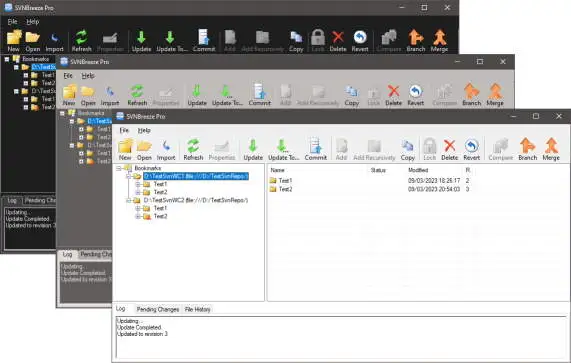
SVNBreeze workspace view — clean, fast, and built for real-world SVN workflows.
Workspaces: A Unique Feature That Saves Time
One of SVNBreeze's standout capabilities is its Workspace system.
Many developers work on projects that span several repositories, modules, or folder locations.
Traditional SVN tools force you to manage each location separately - switching windows, navigating folders, and repeating the same actions over and over.
SVNBreeze solves this with Workspaces.
A Workspace lets you bring together any number of Subversion folders into a single, organised view. You can group related working copies, libraries, modules, or client projects and manage them as one unit. This makes it dramatically easier to:
- update everything at once
- review changes across multiple components
- keep large projects consistent
- avoid missing updates in scattered locations
For developers working with multi-repo solutions, Workspaces become an essential productivity tool.
Designed for Real-World SVN Workflows
SVNBreeze focuses on the tasks developers perform every day:
- checking out repositories
- committing changes
- resolving conflicts
- reviewing diffs
- switching branches
- merging features
- keeping multiple working copies in sync
Everything is presented clearly, without clutter, and without forcing you through complex menus. It's SVN made practical.
Why Choose SVNBreeze?
- Faster and easier to use than command-line SVN
- Ideal for developers managing multiple repositories
- Clean, modern UI with no bloat
- Workspace support for multi-location projects
- Suitable for both personal and commercial environments